Turn every new tab into your
personal productivity hub
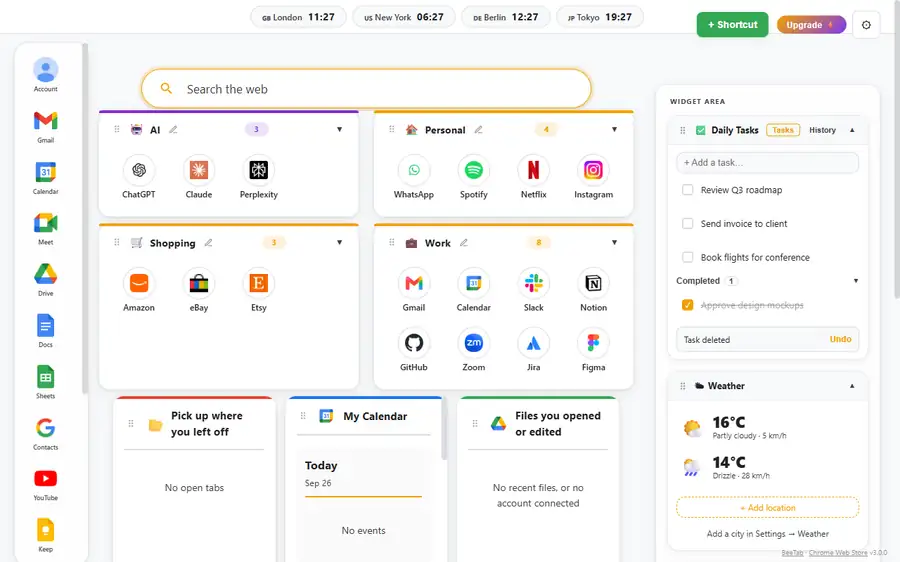
BeeTab is your personal productivity hub for Chrome — a fast, focused dashboard with smart shortcuts, world clocks, tasks, weather, calculator, Google Calendar and Drive. The tools you use throughout the day, always one tab away.

Everything you need to stay productive, one tab away
The productivity dashboard for every new tab — eight focused tools, one clean workspace.
Smart Shortcuts
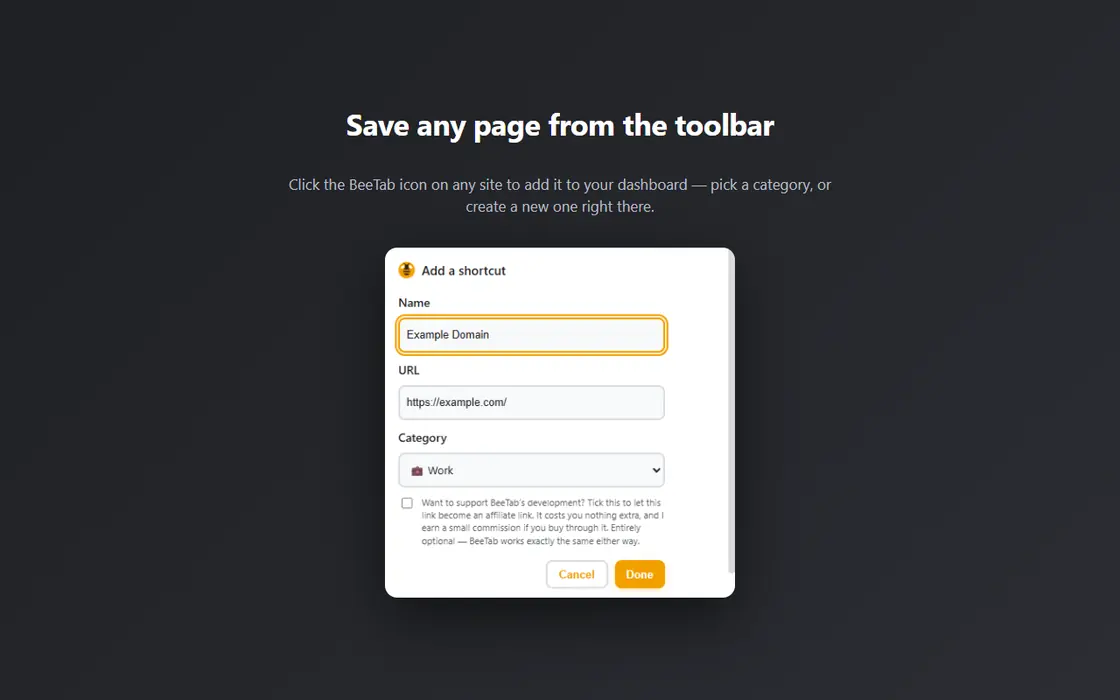
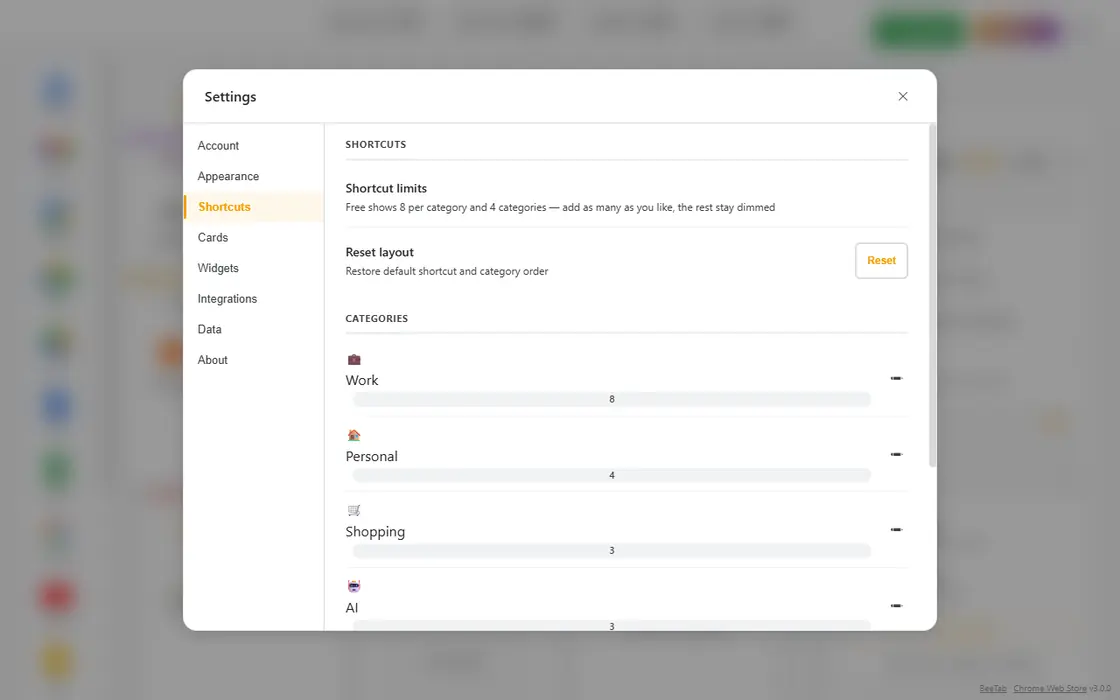
Organize your most-visited websites into customizable categories. Add names, URLs, and custom favicons. Collapse or expand categories, drag & drop to reorder shortcuts or entire sections. Perfect for work, personal, tools, and social — all instantly accessible. Create your own categories (any emoji + name), and upload custom icons — images are resized automatically.
Free: 4 categories, 8 shortcuts each Pro: UnlimitedQuick-Access Google Sidebar
A slim sidebar keeps your Google services one click away. Drag any icon to reorder it exactly how you like; your arrangement is saved and synced.
Available on all plansWorld Clocks Bar
Keep track of time across the globe with live, accurate clocks that automatically adjust for daylight saving time. Click any clock to open the Clock Manager where you can search from 85+ cities, reorder, and manage your list. Ideal for remote teams and international collaborators.
Free: 3 clocks Pro: UnlimitedDaily Tasks
A powerful yet simple to-do list always one tab away. Add tasks instantly, mark them complete, drag to reorder, and edit inline. Deleted tasks can be restored with undo. Pro users enjoy unlimited tasks and a full 30-day completion history.
Free: 5 active tasks Pro: Unlimited + 30-day historyWeather Widget
See current temperature, conditions, and wind speed for your chosen locations. Search cities in any language — results merge English and local names for maximum convenience. Stay weather-aware without switching tabs.
Free: 1 location Pro: Unlimited locationsTape Calculator
A satisfying, old-school running-tape calculator that shows your full calculation history. Supports +, −, ×, ÷, %, backspace, and full keyboard input. Built from scratch for safety and speed — no eval(), fully compliant with Chrome’s security standards.
100% Safe & SecureStay in Flow Cards
Open Tabs — See and switch to your recent browser tabs instantly. Google Calendar — View upcoming events for the next 7 days. Google Drive — Access files you recently edited.
Available on all plansFully Customizable Layout
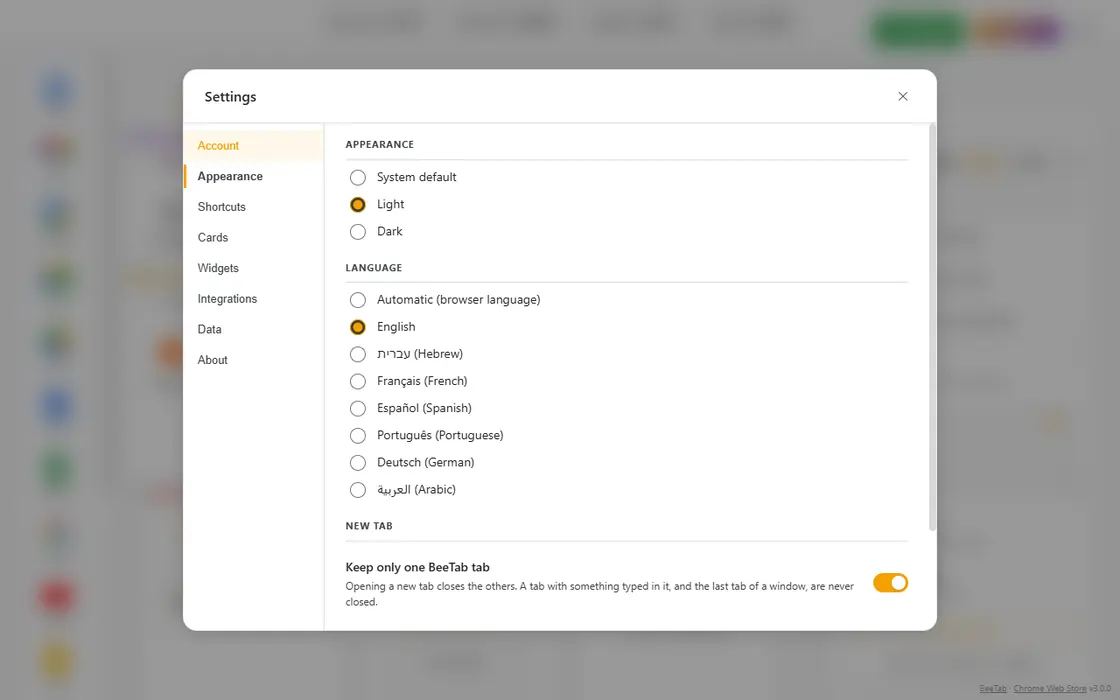
Drag cards and widgets to any order. Resize rows vertically. Choose between light, dark, or system theme. Pick any background color or use one of the presets. The interface adapts beautifully to any screen size with smooth drag & drop everywhere.
Available on all plansTeam & Organization Setup
Build the perfect dashboard once, then export your settings to a single file. Share it with your whole team so everyone imports the same ready-made setup — shortcuts, categories, clocks, widgets, and layout included. License and trial details are never exported, so the file is completely safe to distribute.
Export & ImportPrivacy by Design
Your data stays in your browser and syncs only through your own Chrome profile — never through our servers. No analytics, no tracking. BeeTab connects to Google or Microsoft APIs only when you explicitly sign in. Works offline for core features.
100% PrivateHow BeeTab Works
From install to productivity in under 30 seconds.
Install in Seconds
Add BeeTab from the Chrome Web Store. It immediately replaces your new tab page with a clean, productive dashboard. No sign-up required.
Make It Yours
Add your favorite websites as shortcuts, set up world clocks, create daily tasks, and customize layout, colors, and theme. Everything saves automatically in your browser.
Connect (Optional)
Link your Google account for Calendar and Drive. All connections use official read-only permissions and can be revoked anytime.
Start Every Day Focused
Every new tab becomes your browser productivity workspace — fast, private, and exactly how you want it. Open Chrome and feel the difference immediately.
Zero learning curve. Instant productivity boost.
Built for focus. Designed for you.
BeeTab is not just another new tab extension. It’s your browser productivity workspace — built for efficient, organized, focused work.
Blazing Fast
Loads instantly on every new tab. No waiting, no lag. The lightweight architecture means your browser stays snappy.
100% Private
No analytics, no tracking. Your settings stay in your own Chrome profile, not on our servers. Connects to Google/Microsoft only when you choose to.
Works Offline
Core features — shortcuts, tasks, calculator, world clocks — work without an internet connection. Always reliable.
Full RTL Support
Available in 7 languages: English, Hebrew, French, Spanish, Portuguese, German, and Arabic — with full right-to-left layout for Hebrew and Arabic.
Clean Interface
Thoughtfully designed with smooth drag & drop, beautiful themes, and a layout that adapts to your workflow.
Chrome Store Verified
Published and verified on the official Google Chrome Web Store. Regular updates and transparent development.
A look at BeeTab
Real screenshots — this is the extension, not a mock-up.
Choose the plan that fits your needs
Simple, fair pricing. Start free — upgrade when you’re ready.
Free
- 4 shortcut categories
- 8 shortcuts per category
- 3 world clocks
- 5 active tasks
- 1 weather location
- Open Tabs card
- Google Calendar & Drive
- Tape Calculator
- Custom themes & background
- Drag & drop layout
- RTL / Hebrew support
Pro
- Unlimited categories & shortcuts
- Unlimited world clocks
- Unlimited active tasks
- 30-day task history
- Unlimited weather locations
- Open Tabs card
- Google Calendar & Drive
- Tape Calculator
- Custom themes & background
- Drag & drop layout
- RTL / Hebrew support
- Priority support
- All future features included
Feature Comparison
See exactly what’s included in each plan
| Feature | Free | Pro |
|---|---|---|
| Categories | 4 | Unlimited |
| Shortcuts per category | 8 | Unlimited |
| World Clocks | 3 | Unlimited |
| Active Tasks | 5 | Unlimited |
| Task History | 24 hours | 30 days |
| Weather Locations | 1 | Unlimited |
| Open Tabs | ✓ | ✓ |
| Google Calendar & Drive | ✓ | ✓ |
| Tape Calculator | ✓ | ✓ |
| Custom Themes & Background | ✓ | ✓ |
| Drag & Drop Layout | ✓ | ✓ |
| RTL / Hebrew Support | ✓ | ✓ |
| Price | Free forever | $0.99 / month or $9.99 / year |
| Free Trial | — | 30 days |
📅 Monthly vs Annual — Which is right for you?
📅 Pro Monthly
- Flexible monthly billing
- Cancel anytime — no commitment
- All current & future Pro features
⭐ Pro Annual
- Best Value — save 16%
- Equivalent to $0.83 / month, billed annually
- All current & future Pro features
Both plans include every current and future Pro feature. Your BeeTab setup is always saved — a subscription changes what is active, not what exists.
Start 30 Days FreePrivacy by design
Your data is yours. Full stop.
Stored in Your Browser
Your shortcuts, tasks, and settings live in your browser and sync only through your own Chrome profile — we never store them on our servers.
No Tracking
Zero analytics, no telemetry, no usage data collection of any kind.
No Data on Our Servers
Your personal data is never transmitted to us. License checks send only your license key — nothing else.
Official APIs Only
Only connects to Google and Microsoft when you explicitly sign in, using official, read-only permissions.
Transparent Policy
Our privacy policy is clear, concise, and written in plain English — no legal jargon.
Frequently Asked Questions
Everything you need to know about BeeTab.
Ready to make every new tab productive?
Join thousands of productive users. Takes 5 seconds to install.
🚀 Add BeeTab to Chrome — Free